AI Insights · Practical guide
Local AI vs Cloud AI for Business: Why Running Your Own AI Usually Costs Too Much
Should your company run local AI? Compare real hardware, power and specialist costs for DeepSeek V4.1 Flash against private cloud AI on Azure, Google Cloud and AWS in Australia.
Zlink AI Team9 min read
Listen to this article
Local AI means buying your own powerful computer servers, putting them in your office or private server room, and running AI models yourself instead of renting AI online from companies like Microsoft, Google or Amazon.
Right now, a lot of business owners are asking the same question: should we run our own local AI inside the company?
The short answer for almost every business is no. Running local AI in your company usually costs far more money, takes way more work to maintain, and falls behind faster than most people realise. It is a lot like saying, "My team sends emails every day, so we should build our own email server instead of using Gmail or Microsoft 365."
A quick note: Zlink AI builds AI tools and automation for Australian businesses, and those tools run on secure cloud platforms. We have a clear view on this topic, so we have backed up the numbers below with public pricing and independent research, and we also cover the few rare cases where local AI actually does make sense.
The short answer
- It costs way too much to start and keep running. Even a "free to download" model like DeepSeek V4.1 Flash needs expensive AI hardware, heavy power and cooling, and a specialist to manage it. For most companies, renting the exact same AI online costs a tiny fraction of the price.
- Your hardware sits empty most of the week. Staff work around 40 hours out of a 168-hour week. The other 75% of the time, your expensive AI servers sit idle while still costing you money.
- New models come out every few days. Cloud AI gets smarter and roughly 10 times to 50 times cheaper every year. If you buy local servers, you lock yourself into yesterday's hardware.
- You do not need local AI to get full privacy. Business cloud platforms like Microsoft Azure, Google Cloud and AWS let Australian companies keep their data inside Sydney and Melbourne data centres, locked down, never saved and never used to train AI models.
- Almost nobody actually uses local AI for real daily work. Even when open AI models get millions of downloads, real-world business work still happens almost entirely in the cloud because local setups are slower and waste paid staff time.
Why local AI is the new email server mistake
Think back twenty years ago. Companies used to buy big metal servers, lock them in an air-conditioned room and hire IT staff just to send and receive company email. The main argument was always the same: "Our emails are private, so we must host them ourselves."
Today, almost nobody builds their own email server. Businesses use Gmail (Google Workspace) or Outlook (Microsoft 365).
Why did everyone switch? Because running your own email server had nothing to do with making your business better. It broke at bad times, needed constant security fixes, cost a lot to upgrade and did not win you a single extra customer. Renting email from Google or Microsoft turned out to be cheaper, safer and much more reliable.
Running on-premise AI or self-hosted AI inside a normal company is the exact same trap. Unless your company's main business is building AI servers, managing AI hardware yourself is a distraction that burns cash.
What running local AI actually costs (DeepSeek V4.1 Flash example)
A common mistake is seeing a "free" open AI model online and thinking it is cheap to run inside your office. The software file is free, but the machine needed to run it is not.
Take DeepSeek V4.1 Flash, a fast open model released in late 2026. It is designed to answer quickly by only waking up a small part of its brain for each word. Even so, its full brain is huge (over 550 billion parameters), and the whole model has to sit inside special AI chip memory at the same time. That means you need more than 500 GB of fast AI memory just to turn it on. Normal office computers cannot come close.
Here is what it really costs a business to run DeepSeek V4.1 Flash in-house:
1. The upfront cost to buy the hardware
- A smaller multi-chip office setup: Buying an 8-card workstation rig (such as NVIDIA RTX PRO 6000 class cards) costs roughly US$64,000 to US$128,000 upfront. Even at that price, desktop-style setups slow down badly when several employees use the AI at the same time.
- A real company-grade AI server: To give your whole team fast answers at the same time, you need an enterprise server such as an 8-chip NVIDIA H200 system. Just buying one server costs roughly US$350,000 to US$528,000, before you add high-speed networking, storage or a second backup server in case the first one fails.
2. The yearly costs people forget about
Buying the box is only the start. Keeping local AI alive every year adds three big bills:
- Fast value loss: Normal office computers last five years or more. AI chips age out in about three years because newer, faster chips arrive so quickly. A US$400,000 server loses more than US$130,000 a year in value whether your staff use it or not.
- Electricity and cooling: An enterprise 8-chip AI server uses 10 to 15 kilowatts of power under load, plus extra cooling so it does not overheat. Depending on local power rates, that adds roughly US$14,000 to US$48,000 a year, plus server room rent if you do not already have a chilled data room.
- Hiring a specialist to run it: Regular office IT support usually cannot run large AI clusters, fix memory crashes, update AI serving tools and patch security holes. Hiring one senior AI infrastructure specialist costs US$150,000 to US$250,000+ a year in the United States (median around A$168,000 a year in Australia). Even using half of one specialist's time costs roughly US$80,000 to US$125,000 every year.
3. Compare that to renting the exact same model online
Now look at the published pay-as-you-go online prices for DeepSeek V4.1 Flash (DeepSeek API Pricing):
- Input text costs US$0.15 to US$0.30 per million tokens (and drops to US$0.003 to US$0.006 when repeating cached documents).
- Output text costs US$0.60 to US$1.20 per million tokens.
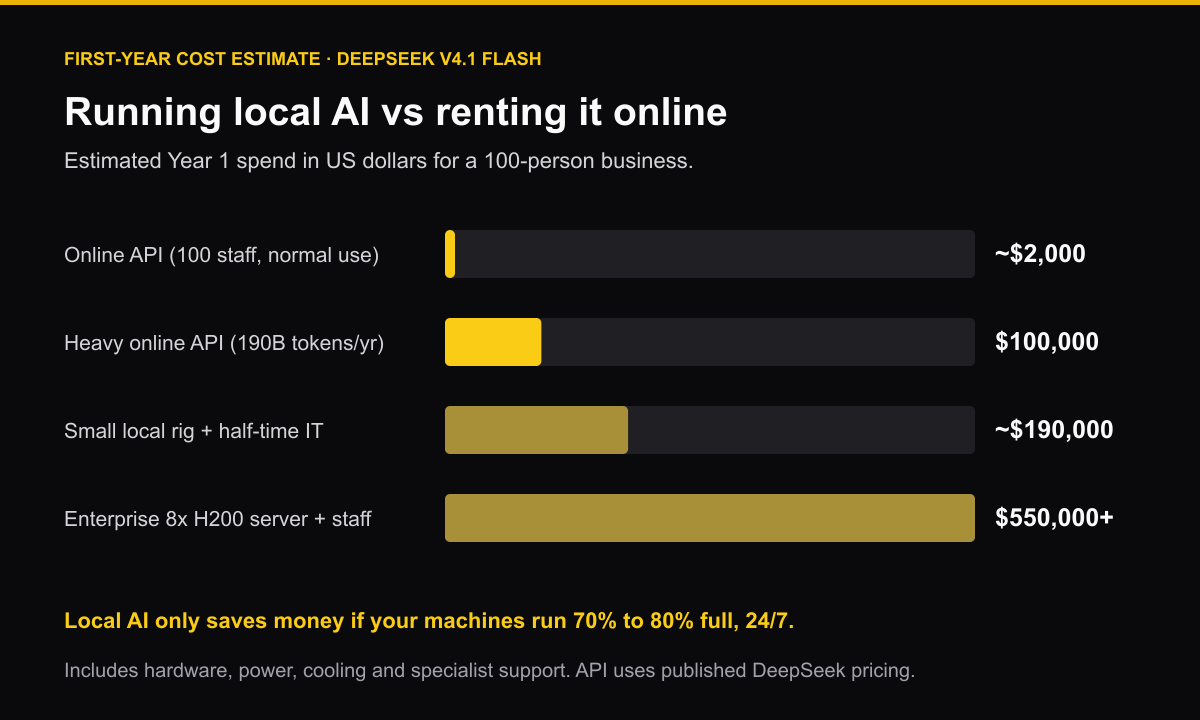
Put that into real business terms. Even at peak rates with zero caching discounts, US$100,000 a year online buys roughly 190 billion tokens (more than 500 million tokens every single day). For a typical 100-person business where every staff member uses AI daily, the whole company's yearly bill for this model would often be just a few thousand dollars a year, less than one week of a specialist's salary.
4. The Empty Office Problem
There is another reason the maths fails for almost every business.
Your team works about 40 hours a week. There are 168 hours in a week. That means for more than 75% of the time (every night, every weekend and every public holiday), your expensive local AI server sits there doing nothing while losing value and burning power.
When you rent cloud AI, you pay zero dollars when nobody is working. Independent cost studies show that owning AI hardware only starts beating online pay-as-you-go pricing when your servers run 70% to 80% full, 24 hours a day, 7 days a week. Almost no regular company uses AI like that.
Why your expensive hardware will feel old next month
Even if you somehow did not mind the upfront price, there is a second problem: AI moves faster than any technology businesses have ever bought.
Right now, major labs including OpenAI, Google, Anthropic, DeepSeek and Alibaba release faster, smarter and cheaper models every few weeks, and sometimes only days apart.
Research from Epoch AI and the Stanford AI Index shows that the online cost to buy the same level of AI smarts has been dropping by 10 times to 50 times every single year. Something that cost US$20 two years ago now costs a few cents.
Think about what that means for your wallet:
- With cloud AI: When a better, cheaper model comes out on Tuesday morning, your team switches to it in one minute. You get smarter results right away, and your monthly bill often drops.
- With local AI: Your money is trapped inside hardware you bought last year. Every time a better model comes out, your IT team has to download hundreds of gigabytes of files, test whether it fits in memory, upgrade the software and fix whatever breaks. Worse still, new models are built for newer chips, so your expensive server falls behind faster every month.
The privacy myth: private cloud AI already exists
Whenever people argue for local AI in business, they almost always end with one word: privacy.
That makes total sense if you think "cloud AI" means pasting secret company files into a free public chatbot. You should never put private customer records into a free consumer tool.
But private cloud AI for business is completely different. The three biggest cloud providers, Microsoft Azure, Google Cloud and Amazon Web Services (AWS), all run private enterprise AI services built specifically for businesses and governments:
- Microsoft Azure (Azure OpenAI / AI Foundry): Your prompts stay inside your own private Microsoft network. Microsoft does not share your data with OpenAI for training, and businesses can apply for modified abuse monitoring so prompts are not stored.
- Amazon Web Services (Amazon Bedrock): Your requests run in isolated AWS accounts. Model makers cannot see your data, your data is never used to train models, and you can turn off data storage directly in your settings.
- Google Cloud (Vertex AI): Your data stays locked inside your own Google Cloud project, protected by your own encryption keys, and is never used to train Google's public models.
Keeping your data inside Australia
For Australian businesses following the Privacy Act 1988 and guidance from the Office of the Australian Information Commissioner (OAIC), location matters. Microsoft, Google and Amazon all operate major data regions right here in Sydney and Melbourne, so your company's AI data can stay onshore inside Australia under Australian law. (If you want to learn more about how local cloud facilities work, read our plain-English guide on data centres in Australia.)
One honest security truth
Most businesses already trust Microsoft, Google or Amazon with their company emails, accounting software, bank records and customer lists. Those cloud giants spend billions of dollars a year on full-time cybersecurity teams.
Putting a do-it-yourself AI server in your office does not automatically make you safer. In fact, it can make you less safe if a server port is left open by accident, a security update gets missed or someone downloads an unsafe model file from the internet.
Hype vs reality: millions of downloads, almost nobody uses it at work
If you browse social media or tech forums, it can look like everyone is running local AI. Open models get millions of downloads.
In reality, downloads do not equal daily business use. Tech creator Theo (t3.gg) broke this down clearly in his video on local AI: even when local models rack up millions of downloads, only a tiny sliver of developers (less than 1% in coding discussions) actually rely on them for real day-to-day work.
Why is the gap so huge?
- Downloading is fun; working is different. Tech fans love downloading a free model on the weekend to see if their laptop can run it. That counts as a download, not a business workflow.
- Big real-world tasks choke local hardware. When staff ask AI to read long contracts, search messy company folders or help write real software, local machines slow to a crawl or give weaker answers.
- Slow AI wastes expensive staff time. Imagine paying a skilled employee A$60 to A$120 an hour. If a weaker local AI wastes just 30 minutes of their day giving bad answers they have to fix by hand, you just lost more money in one afternoon than a whole month of fast cloud AI costs.
The 3 rare times local AI actually makes sense
Being fair matters. Local AI is a bad deal for 95%+ of businesses, but there are three narrow cases where running your own AI can make sense:
- Top-secret offline work: Defence contractors, intelligence agencies or classified research labs that are legally banned from connecting to the internet at all.
- Giant 24/7 AI factories: Massive tech companies running automated AI tasks around the clock at 70% to 80%+ capacity, where monthly cloud bills reach tens or hundreds of thousands of dollars every single month.
- Tiny, simple tasks on laptops you already own: Small lightweight models used for basic offline jobs (like transcribing voice notes or sorting short forms) that run on normal office laptops without buying expensive AI servers.
If your business does not fit one of those three boxes, buying local AI servers is almost certainly the wrong move.
The bottom line for business owners
Treat AI the same way you treat electricity and email. You do not build a power plant behind your office just because you turn on the lights every day, and you do not build an email server just because your staff send emails.
Before spending a dollar on local AI hardware, ask yourself three simple questions:
- Will our AI servers stay 70% to 80% busy 24 hours a day, 7 days a week? If not, you are paying for idle metal.
- Do we have the budget for a specialist to maintain, patch and upgrade it every week? If not, it will quickly break or fall behind.
- Can private cloud AI in Sydney or Melbourne (Azure, AWS or Google Cloud) meet our privacy rules? For almost every business, the answer is yes.
Keep your cash, rent fast private cloud AI that upgrades itself every week, and spend your budget on AI workflows that actually win customers and save your team hours of manual work.
If you want help setting up practical, private cloud AI in your business, Zlink AI builds AI automation, AI receptionists and AI customer service chatbots for Australian companies. Book a free consultation and we will give you an honest breakdown of what is worth building and what is not.
Frequently asked questions
Is local AI cheaper than cloud AI for a business?
Almost never for a normal business. While the AI model software can be free to download, the server hardware, electricity, cooling, fast value loss and specialist staff needed to run it properly usually cost hundreds of thousands of dollars over three years. For most 10-person to 200-person companies, paying per use on cloud AI is 10 to 50 times cheaper.
How much does it cost to run DeepSeek locally in a company?
To run a large modern model like DeepSeek V4.1 Flash smoothly for multiple staff members, a company needs over 500 GB of fast AI chip memory. A smaller multi-GPU office build starts around US$64,000 to US$128,000, while an enterprise 8-chip H200 server costs roughly US$350,000 to US$528,000 upfront, plus yearly power, cooling and specialist support. By comparison, renting the same model via DeepSeek's online API costs US$0.15 to US$1.20 per million tokens.
Is cloud AI safe for private company data in Australia?
Yes, as long as you use business cloud services rather than free public consumer apps. Microsoft Azure, Google Cloud and AWS all offer private enterprise AI hosted in Sydney and Melbourne data centres, with zero model training on your data, private network connections and options to stop prompts from being stored.
Why do so many people download local AI if businesses rarely use it?
Millions of developers and tech hobbyists download local AI tools to learn, test new models on weekends or experiment on their personal laptops. When it comes to fast, reliable daily work inside a company, almost everyone chooses cloud AI because it is smarter, faster and cheaper than buying and managing local servers.
When should a company actually run local AI?
Local AI only makes practical sense if your organisation is legally required to stay completely offline (such as defence or classified work), if you process huge AI workloads 24 hours a day at 70% to 80%+ server usage, or if you only need tiny simple tools that run on ordinary laptops you already own.